
Row Grouping
comins-table@0.2.2
Playground paths below are local routes for the module repository’s development server. They are not live routes on this documentation site.
Starting with 0.2.2, .render is the standard UI customization entry point. Legacy properties remain supported throughout 0.x, with removal targeted for 1.0.0. See the migration rules.
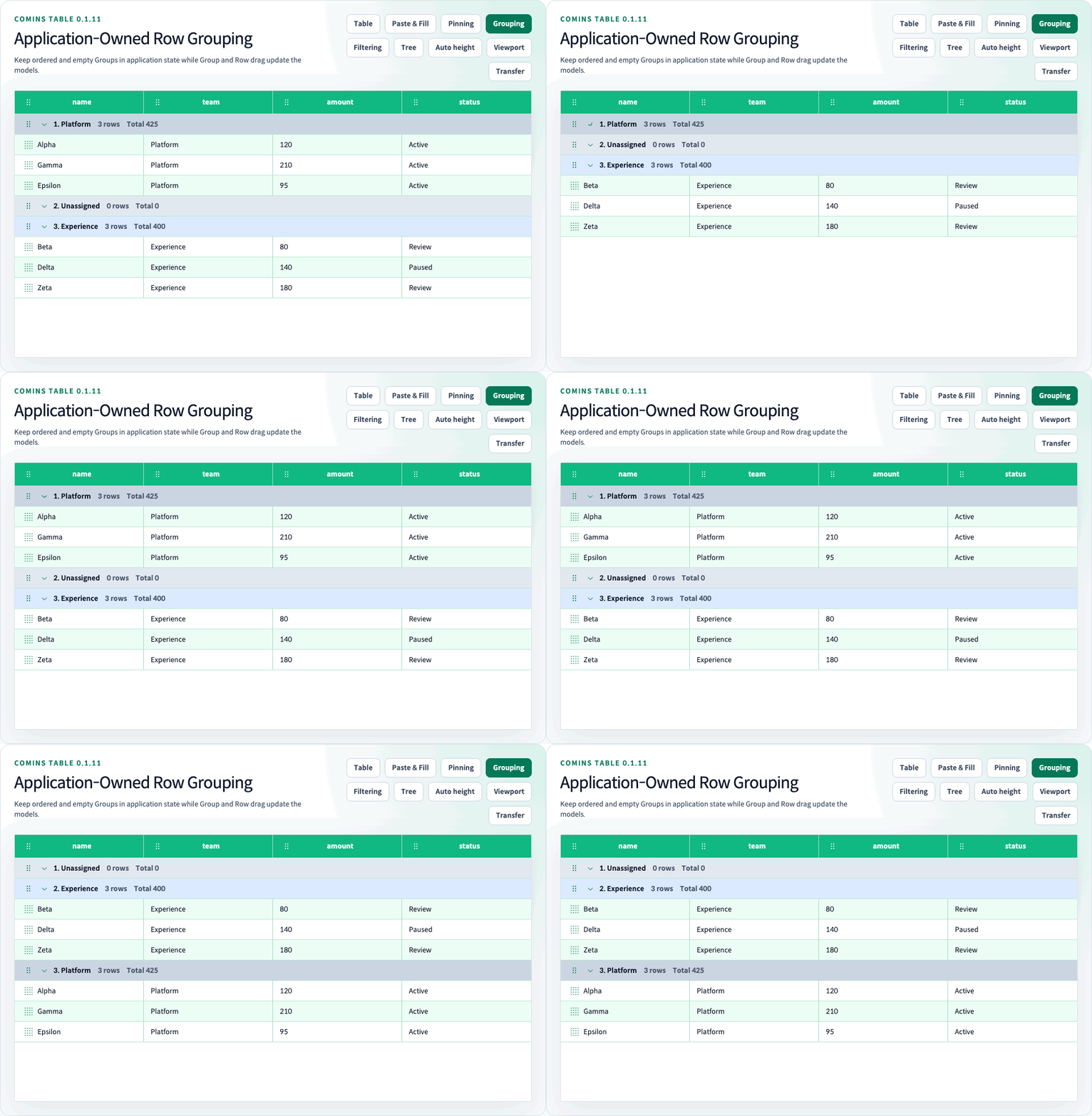
Comins Table renders application-owned flat data inside an application-owned, single-depth groups model. The order of the groups array is the actual Group order, including empty Groups. Synthetic Group Rows never become TData or business Row IDs.
Run the /examples/row-grouping (/examples/row-grouping) Playground route for explicit Group CRUD, Group and Row Drag, custom Group content and styling, Row Detail, aggregation, sorting, and 100000-leaf virtualization.
Controlled Group model
Section titled “Controlled Group model”CominsRowGroupingConfig<TData, TGroup> preserves the application Row and Group types. Custom content receives CominsRowGroupRenderParams<TData, TGroup> so group, aggregates, expansion, and the current groupIndex remain typed.
type Group = { id: string; label: string };type Row = { amount: number; groupId: string; id: string; name: string };
const [groups, setGroups] = useState<Group[]>([  { id: "east", label: "East" },  { id: "empty", label: "Empty" },  { id: "west", label: "West" },]);const [rows, setRows] = useState<Row[]>(initialRows);const [expandedGroupIds, setExpandedGroupIds] = useState<CominsRowId[]>([]);
<CominsTable  columns={columns}  data={rows}  getRowId={(row) => row.id}  onChangeData={setRows}  rowGrouping={{    aggregations: { amount: "sum", id: "count" },    expandedGroupIds,    getGroupId: (group) => group.id,    label: { render: (group) => group.label },    getRowGroupId: (row) => row.groupId,    groupDraggable: true,    groups,    onChangeExpandedGroupIds: setExpandedGroupIds,    onChangeGroups: setGroups,    setRowGroupId: ({ row, toGroupId }) => ({      ...row,      groupId: String(toGroupId),    }),  }}  rowProps={{ draggable: true }}  virtualized/>;
groups is the only Group order source of truth. Do not duplicate that position in an index or order field. getGroupId must return a stable string or number that is not changed by renaming or moving the Group. Duplicate IDs after the first occurrence are ignored.
getRowGroupId must return an ID present in groups. Before deleting a non-empty Group, the application must reassign or delete its Rows. Comins Table does not mutate Rows when application CRUD removes a Group.
Applications own Group add, update, and delete controls. Keeping a Group object in groups keeps its Group Row visible even when it has no Rows.
Group and Row Drag
Section titled “Group and Row Drag”Set groupDraggable and provide onChangeGroups to enable the library-owned Group Drag handle. A successful drop reorders groups and reports stable IDs plus fromIndex and toIndex. The application must write the next array back to controlled state.
Use the exported pure moveCominsRowGroup helper to produce the same before/after result from application JavaScript without pointer interaction.
Grouped rowProps.draggable uses the existing Row Drag handle. A same-Group drop reorders data. A cross-Group drop also calls setRowGroupId; it is valid only when setRowGroupId and onChangeData are both available. Dropping on a Group Row appends to that Group, so empty and collapsed Groups remain usable targets.
Application JavaScript can call the root/core-exported moveCominsRowToGroup transition with CominsRowGroupMoveOptions<TData>. Pass targetRowId to use the same leaf-target placement or omit it to append to targetGroupId; a cross-Group move requires setRowGroupId. Missing or mismatched targets return the original state without calling the membership setter.
setRowGroupId must preserve the business Row ID returned by getRowId. Changing it during membership movement breaks the identity used by selection, Row Detail, and focus restoration.
Group Drag never changes data. Row Drag never changes the groups order.
Expansion Ref methods
Section titled “Expansion Ref methods”expandedGroupIds is the only expansion source of truth. Disclosure buttons are disabled when onChangeExpandedGroupIds is omitted.
const tableRef = useRef<CominsTableRef<Row>>(null);
tableRef.current?.expandGroups();tableRef.current?.foldGroups();tableRef.current?.expandGroups(["east"]);tableRef.current?.foldGroups(["west"]);
Omitting IDs targets all current Groups. An empty ID array is a no-op and unknown IDs are ignored. Tree Grid continues to use the separate expand and fold methods.
Group Row and custom content
Section titled “Group Row and custom content”Each Group Row contains one native <th scope="rowgroup"> whose colSpan equals the current visible Column count. It has a distinct theme-aware background and the fixed rowHeight baseline.
The Table owns the outer Row and Cell, ARIA, disclosure, Group Drag handle, drop feedback, focus, and virtualization height. getGroupRowProps adds a typed className and style to the outer Group Row, while rowGrouping.content.render replaces only the inner default label/count/aggregate content.
rowGrouping={{ // controlled Group fields omitted getGroupRowProps: ({ group, isEmpty }) => ({ className: isEmpty ? "empty-group-row" : undefined, style: { "--comins-table-group-row-background": isEmpty ? "#e2e8f0" : "#d1d5db", "--comins-table-group-row-color": "#111827", } as React.CSSProperties, }), content: { render: ({ aggregateValues, expanded, group, groupIndex, isEmpty, rowCount, }) => ( <GroupContent amount={aggregateValues.amount} expanded={expanded} group={group} index={groupIndex} isEmpty={isEmpty} rowCount={rowCount} /> ) },}}Both callbacks receive aggregateValues, expanded, group, groupId, groupIndex, isEmpty, and rowCount. groupIndex is the zero-based current groups array position, not a virtual slot or visible leaf index. The default tokens are --comins-table-group-row-background and --comins-table-group-row-color; a custom class can target the stable .comins-table__group-row > .comins-table__group-cell structure when Cell-level borders or decoration are required.
Custom content and styles remain fixed-height. getGroupRowProps.style.height cannot override rowHeight, and multiline or variable-height Group Rows are not supported.
Normal Column Cell renderers, formatters, components, tooltips, Row/Cell callbacks, selection, Clipboard, and Row Detail do not run for Group Rows.
Aggregation and sorting
Section titled “Aggregation and sorting”rowGrouping.aggregations maps an output Column ID to count, sum, avg, min, or max.
countincludes every Group member, including empty values.- Numeric reducers use finite numbers only.
sum,avg,min, andmaxreturn empty when the Group has no finite numeric value.- An empty Group has
count = 0. - Expansion does not change aggregate input.
Header sorting never reorders Group Rows. The same existing sortModel and Column comparators are applied independently to the member Rows of every Group. Group Drag order therefore remains visible across ascending, descending, and multi-column Row sorting.
Membership uses one O(N + G) pass. Per-Group sorting costs O(sum(nᵢ log nᵢ)), with the same O(N log N) worst case as flat Row sorting. The implementation does not filter all data once per Group.
Leaf interaction and boundaries
Section titled “Leaf interaction and boundaries”Visible leaf callbacks preserve the existing contract:
row.datais the originalTData.row.dataIndexis the sourcedataindex.row.idis the business Row ID.row.indexis the visible leaf index; Group Rows do not increment it.
Collapsed Groups keep selected Row IDs and expanded Detail IDs dormant. Cell ranges, copy, and paste follow the current grouped leaf order and never include Group Rows.
Column Pinning continues to apply to ordinary leaf Cells and Headers; the single spanning Group Cell itself is not pinned. Visual Fill Handle UI applies only to visible business leaf Cells; Group headings remain outside editing. Existing leaf-only selection and Clipboard behavior is unchanged.
Row Grouping remains a client-side flat-table feature and cannot be combined with pagination, infinite/lazy loading, Viewport Datasource, or Tree Grid. Business Rows support fixed or automatic heights through getRowHeight and variable-height virtualization; Group headings keep the fixed rowHeight. Grouped leaf Row Detail remains supported through rowDetail.render. See Automatic Row Height. Multi-depth Group trees, Group selection, variable-height Group Rows, server grouping, Pivot, custom reducers, and aggregate sorting are outside this release.
Controlled Column Filtering may run before Group membership. Every explicit Group remains in its application-owned position, while counts, aggregates, and member sorting use filtered leaf Rows. Row Drag is disabled for this combination, but Group Drag may continue to reorder the explicit Group model.