
Clipboard
comins-table@0.2.2
Playground paths below are local routes for the module repository’s development server. They are not live routes on this documentation site.
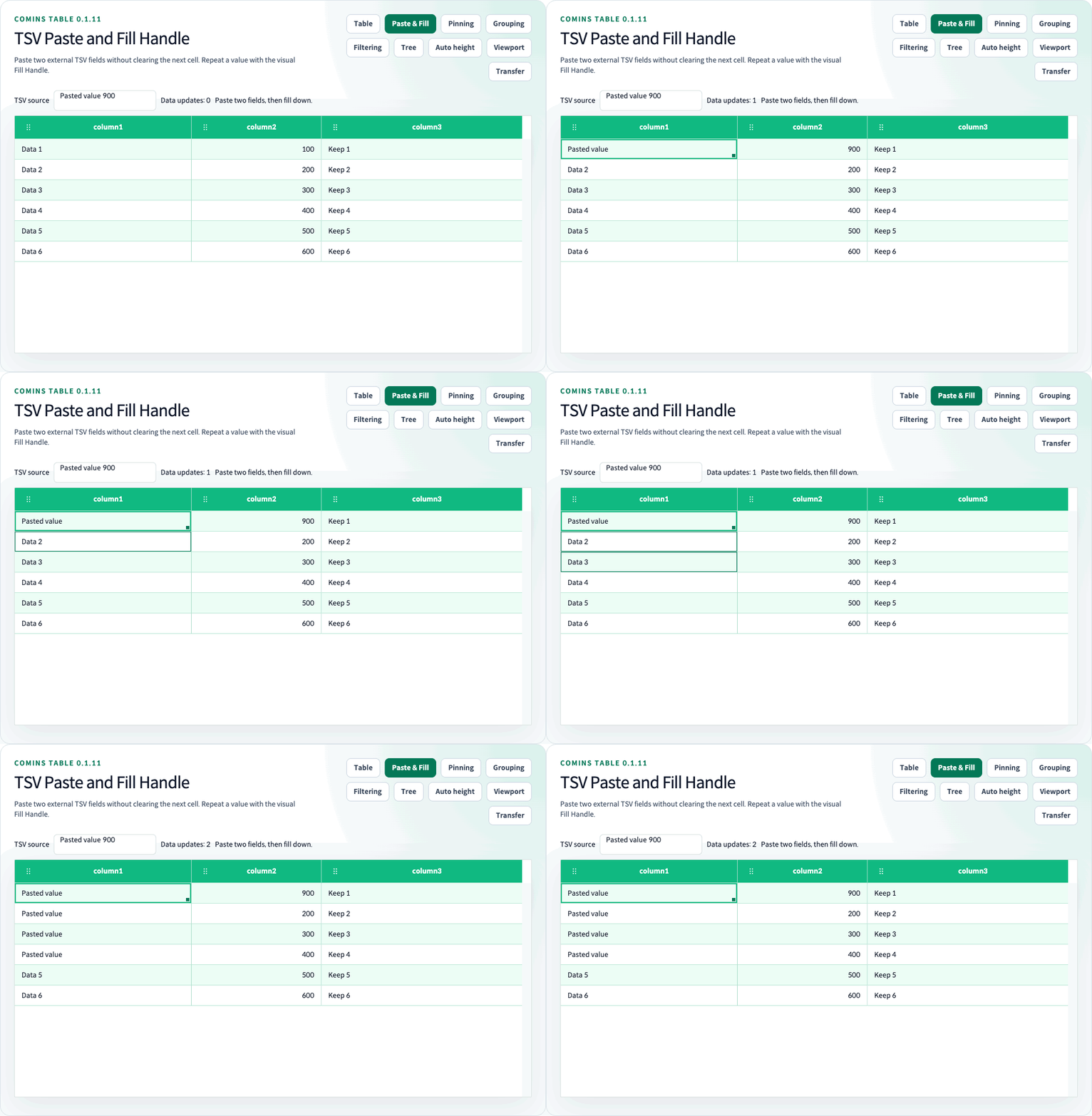
Clipboard helpers are available from the root export, comins-table/core, and the comins-table/clipboard subpath.
In 0.2.x, the root and /clipboard operate on React state with cell.props guards. /core operates on neutral state with direct cell.copyable/cell.pasteable/cell.disabled policies. See the 0.2.0 migration and do not mix these state contracts.
import { copyCominsCell, copyCominsCellRange, copyCominsRow, fillCominsCellRange, pasteCominsCell, pasteCominsCellRange, pasteCominsRow,} from "comins-table/clipboard";copyCominsRow and pasteCominsRow work with whole rows. copyCominsCell and pasteCominsCell work with one cell. copyCominsCellRange and pasteCominsCellRange work with the current selected range.
fillCominsCellRange repeats a single value or rectangular source pattern. Version 0.1.11 also provides opt-in Visual Fill Handle UI.
React Table Keyboard Flow
Section titled “React Table Keyboard Flow”Keep Rows in React state and pass onChangeData={setRows} so Ctrl/Cmd+C and Ctrl/Cmd+V update controlled data. Column-level cell.props.copyable and cell.props.pasteable guards exclude protected values.
The runnable /examples/selection-clipboard (/examples/selection-clipboard) route combines the clipboard flow with cellSelection and visible onChangeSelection output.
Click a Cell to focus it, copy with Ctrl/Cmd+C, then click the destination Cell and paste with Ctrl/Cmd+V. With cellSelection, dragging a range keeps keyboard focus on the starting Cell so the selected range can be copied immediately. Clicking an interactive element inside cell.renderer preserves that element’s native focus. By default, the Table keyboard flow uses an internal copy buffer. Enable clipboard to also copy to the operating-system clipboard with the selection policy below.
Selection copy and OS clipboard
Section titled “Selection copy and OS clipboard”Set clipboard on CominsTable to enable the native copy event. The default is false for compatibility with the internal buffer flow. With clipboard, keyboard copy and ref.current.copySelection() use the same priority: multiple selected Cells, then selected Rows, then one selected Cell. Five selected Rows plus three selected Cells copy the three Cells without changing the five selected Rows. Five Rows plus one Cell copy the Rows.
copySelection(target?: CominsCopyTarget) accepts "auto", "cells", or "rows". Call it from a user-initiated button or context menu and handle rejected clipboard access. This Ref method writes to the OS clipboard even when the clipboard prop is false; the prop controls keyboard copy. It returns Promise<string | null> with the written text, returns null for no copyable selection, and rejects if browser clipboard writing is unavailable or denied. Keyboard copy uses the native copy event; editable inputs keep native text copying.
| Target | Copied data |
|---|---|
"auto" or omitted |
Multiple selected Cells → selected Rows → one selected Cell |
"cells" |
The selected Cell set or rectangle, ignoring Row selection |
"rows" |
Visible Columns of selected Rows, ignoring Cell selection |
With cellSelection, plain click, Shift+click, and pointer range selection focus the Cell and clear page text selection so Ctrl/Cmd+C immediately copies the Table selection. Copying updates the internal paste buffer to the latest copied values. Right-clicking inside the selected Cell set or range preserves it for a context-menu copy action. Selection getters remain independent of copying; see Selection.
Values use TSV with quoted delimiters/newlines. String formula prefixes are escaped for spreadsheet pasting; numeric values and internal paste values remain raw. copyable: false or disabled Cells produce empty positions. Discontiguous Cells form their smallest enclosing rectangle with unselected positions empty; internal paste skips those positions. Copy uses visible Columns and projected Row order. Hidden or collapsed Rows are excluded from copy; selection getters still expose loaded selected business Rows.
Viewport copying never fetches unloaded Rows. A Cell rectangle crossing an unloaded gap is rejected; selected Row copy uses only loaded selected Rows. CominsSelectionCopy describes the resolved target, text, and internal matrix. Without clipboardPaste, Ctrl/Cmd+V continues using the Table’s internal buffer.
External paste (0.1.11)
Section titled “External paste (0.1.11)”Set clipboardPaste to handle native paste events. It defaults to false, independently of clipboard. Enable both for OS copy and paste. cellSelection and onChangeData are required; loading and read-only Tables do not accept these edits. Text inputs, textareas, selects, and contenteditable renderers retain native editing. No asynchronous clipboard read or read permission is requested.
The Table reads only text/plain TSV. parseCominsClipboardText(text) returns a string matrix and supports tabs, CRLF/newlines, quoted delimiters, doubled quotes, and empty Cells. A terminal record separator does not create an additional Row. HTML and formulas are plain text; neither is evaluated. Strings escaped during OS copying keep their spreadsheet-protection apostrophe when pasted back. OS paste cannot recover internal types or distinguish an empty unselected position from an intentional empty string.
Paste begins at the upper-left of a selected rectangle, or the focused Cell otherwise. It follows displayed Column order and sorted/filtered/expanded business Row order within the current page. Hidden Columns and Group/Detail headings are not destinations. Data boundaries clip overflow; a ragged record leaves missing positions unchanged. Disabled Rows/Cells and pasteable: false Cells are skipped without shifting subsequent values. Protect ID and computed Columns explicitly.
Values default to strings. column.cell.parseClipboard({ text, value, row, column, selection }) converts text to an application value, using the original destination Row. For example, a numeric Column can reject an empty/non-finite number. A thrown parser or guard cancels the entire batch. onClipboardError(error) reports malformed text, limit errors, unavailable Viewport ranges, or parser/guard failures; the application owns error presentation. The input limit is 1,000,000 UTF-16 characters and 100,000 parsed Cells; the enclosing paste rectangle also cannot exceed 100,000 Cells.
const columns: CominsTableColumn<Row>[] = [ { field: "id", label: "id", cell: { props: { pasteable: false } } }, { field: "amount", label: "amount", cell: { parseClipboard: ({ text }) => { if (!text.trim() || !Number.isFinite(Number(text))) throw new Error("Invalid amount"); return Number(text); }, validateFill: ({ value }) => { if (typeof value !== "number" || !Number.isFinite(value)) throw new Error("Invalid amount"); }, } },];<CominsTable columns={columns} data={rows} getRowId={row => row.id} onChangeData={setRows} clipboard clipboardPaste fillHandle onClipboardError={error => setError(error.message)} />;pasteCominsText(state, target, text, rowIds?) exposes the same immutable parse/guard/batch behavior through the root, /core, and /clipboard exports. Core helpers default to data order; pass projected Row IDs when using a sorted or filtered view. The React adapter handles projection and disabled Row guards. One successful user operation produces at most one onChangeData callback; no-op and rejected edits produce none.
Fill Handle (0.1.11)
Section titled “Fill Handle (0.1.11)”Set fillHandle (default false) with cellSelection and onChangeData. A selected Cell or rectangle shows a 24px corner control with an 8px accent marker. Discontiguous Cell sets do not show a handle. Drag outside the source rectangle to extend along one axis; a two-dimensional source repeats as a tile, aligned to its original position. Values retain their types and do not pass through parseClipboard. Source copyable and destination pasteable/disabled guards apply.
Use optional cell.validateFill({ value, row, column, selection }) to check a destination candidate before committing. value is the original typed candidate (unknown); row describes the unchanged destination Row. The synchronous callback accepts by returning true or undefined, and rejects by returning false or throwing an error. Rejection cancels the entire Fill: no data changes or onChangeData notification, fillSelection() returns false, and React calls onClipboardError. Core fillCominsCellRange throws the error. Protected and unchanged destinations are not validated. Omit the hook to keep unrestricted typed repetition. Validators must not mutate the supplied data; asynchronous validation is not supported. Viewport validation receives absolute Row indexes.
Dragging previews the destination, supports vertical and horizontal edge scrolling, and commits once on release. Escape, pointer cancellation, window blur, a changed source model/selection/order, and returning inside the source cancel the write. Shrinking never clears source Cells. Automatic numeric/date series and clearing on shrink are not supported. A fill rectangle is limited to 100,000 Cells; the UI does not preview a larger target.
Click the handle to open Fill down / Fill right actions, or use ref.current.fillSelection("down" | "right") from an application button. Fill down repeats the selection’s first Row over the selected Rows; Fill right repeats its first Column over the selected Columns. The Ref method returns true only when data changed. The menu supports native keyboard buttons and Escape with focus recovery; it provides an alternative to dragging.
fillCominsCellRange(state, { source, target }, rowIds?) accepts either a Cell address (compatible with previous versions) or a rectangular source. Automatic height, pinning, virtualization, Tree business Rows, and visible grouped leaves use the same edit path. Viewport edits require a contiguous loaded target; they never request missing data or cross cache gaps. Parser callbacks receive absolute Viewport indexes. Cache/model replacement during a drag cancels it; durable storage and refresh remain application-owned.
Paste & Fill Handle Playground (/examples/fill-handle)