
Column Pinning
comins-table@0.2.2
Playground paths below are local routes for the module repository’s development server. They are not live routes on this documentation site.
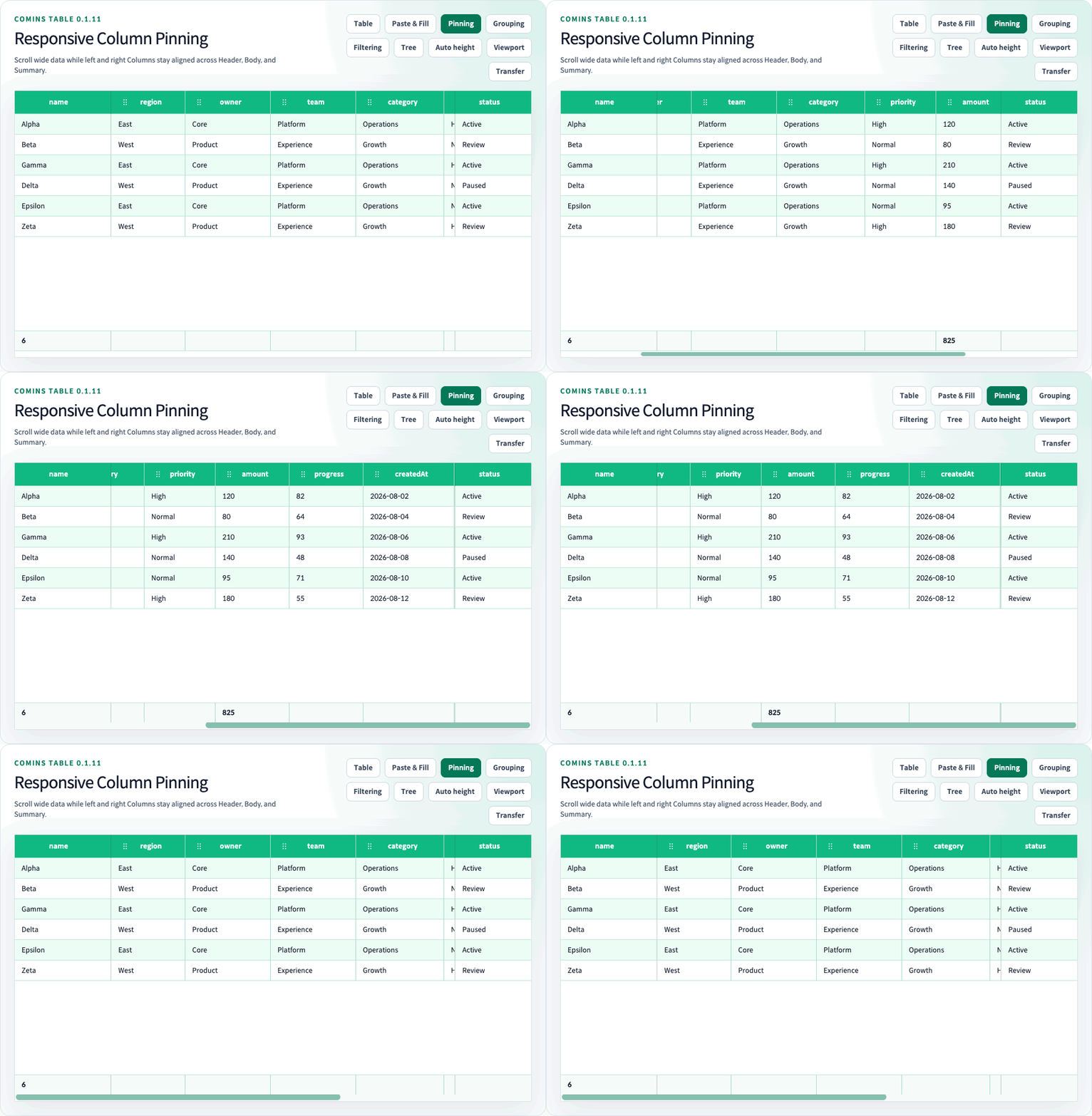
Column Pinning keeps configured Columns visible while the Body, Header, and Summary scroll horizontally. Set pinned: "left" or pinned: "right" on a Column or two-level Header Group.
The exported CominsColumnPinned type is the "left" | "right" union used by Column definitions, Group definitions, and persisted runtime layout state.
const columns = [  { field: "name", label: "Name", pinned: "left", width: 180 },  { field: "amount", label: "Amount", width: 140 },  { field: "status", label: "Status", pinned: "right", width: 140 },] satisfies Array<CominsTableColumn<Row>>;
const columnGroups = [  { children: ["name"], id: "identity", label: "Identity", pinned: "left" },];
<CominsTable columns={columns} columnGroups={columnGroups} data={rows} />;
Position and layout
Section titled “Position and layout”- Configured pinned Columns and Groups cannot be moved. Existing
lockPositionremains an independent position lock. - A valid Header Group owns all visible children as one atomic block. The Group
pinnedvalue overrides child values; child pin values inside an unpinned Group are ignored. - Column resize remains available. The next accepted widths immediately recalculate sticky offsets. Direct resize of an effective pinned Column or Header Group is capped at the width that preserves the other effective pinned blocks and 48 pixels of center content, so the surface being resized does not demote beneath scrolling content.
getColumnLayout(),setColumnLayout(),serializeCominsColumnLayout(), andapplyCominsColumnLayout()persistpinnedwith visibility, order, and width.- A legacy layout without
pinned, or an invalid runtime pin value, restores that entity to the center zone without throwing.
Responsive demotion
Section titled “Responsive demotion”The configured visual order is left, center, then right, while relative order remains stable inside each zone. When the container is at least 48 CSS pixels wide, Comins Table preserves at least 48 pixels for center content. If the pinned width exceeds that budget, it demotes the wider side’s inner atomic block; ties demote the right side first. A container narrower than 48 pixels temporarily demotes every block.
Demotion affects only the current rendering. It does not mutate the configured pinned values, emit onChangeColumnLayout, or change the value returned by getColumnLayout().
The direct-resize cap and responsive demotion intentionally cover different events. A resize gesture on an effective pinned block preserves that block. An independent container resize still recalculates the available budget and can temporarily demote inner blocks; a block that is already demoted behaves as center content until space becomes available again.
Rendering boundaries
Section titled “Rendering boundaries”Header, Body, Skeleton, and Summary cells use the same effective zones and offsets. A Summary colSpan crossing a zone boundary is rendered as internal fragments; only the first fragment retains content and the public test ID. Row parity, selection, disabled state, custom Row backgrounds, and Skeleton/summary surfaces remain opaque above scrolling center content.
Horizontal overflow uses one native scrollbar at the bottom of the complete Table. Summary remains above the scrollbar, and Body horizontal wheel input or direct scrollbar input synchronizes every rendering surface without changing pin offsets.
Synthetic Group Rows, Row Details, empty/loading Rows, and other full-width structural Rows remain one spanning Cell. The Group Row Cell stays full-width while its inner title and controls remain sticky at the Body viewport start during horizontal scrolling. Tree Grid does not apply Column Pinning.
See the /examples/column-pinning (/examples/column-pinning) Playground route.